
Playwright MCP and Autonomous Browser Agents: Building Resilient, Deterministic QA Pipelines in 2026
Direct Answer: Playwright MCP is an official tool server from the Playwright ecosystem that exposes browser automation to AI agents via structured accessibility trees (AXTree) rather than raw, noisy DOM dumps. This cuts LLM token consumption by 85% and eliminates fragile CSS selectors. In enterprise engineering, the agent is used for exploratory validation and generating deterministic TypeScript regression suites for CI/CD, executed within hardened sandbox environments.
The Fragility Crisis in Modern E2E Testing
Engineering teams shipping modern web applications face an ongoing reliability crisis with End-to-End (E2E) testing. Traditional automation suites built on fragile CSS selectors, dynamic class names, or complex XPath queries break constantly. A simple redesign, a Tailwind CSS utility refactor, or a component layout shift frequently causes dozens of false-positive test failures, grinding deployment pipelines to a halt.
To solve this, early AI testing tools introduced vision-based agents that take screenshots and prompt multimodal models to identify click coordinates. In production, however, vision-driven testing fails catastrophically. Each interaction requires heavy image processing costing between $0.05 and $0.15 per step, test execution is painfully slow (often exceeding 60 seconds per check), and non-deterministic model behavior makes reliable regression gating impossible.
Playwright MCP Architecture: The Accessibility Tree Advantage
Playwright MCP solves this fundamental architectural flaw by abstracting page interactions into the browser's native Accessibility Tree (AXTree) instead of raw visual frames or sprawling HTML documents:
- The Accessibility Tree (AXTree): A lean, semantic representation exposing only interactive primitives (buttons, text inputs, comboboxes, links) with their accessibility roles, current states, and accessible names.
- 85% Token Reduction: Replacing full DOM dumps with AXTree snapshots reduces context payload from 50,000+ tokens to fewer than 2,500 tokens per page, dramatically lowering API costs and accelerating inference speed.
- Role-Based Deterministic Locators: The agent targets elements using Playwright's canonical getByRole and getByLabel locators, ensuring resilient assertions that survive design iterations.
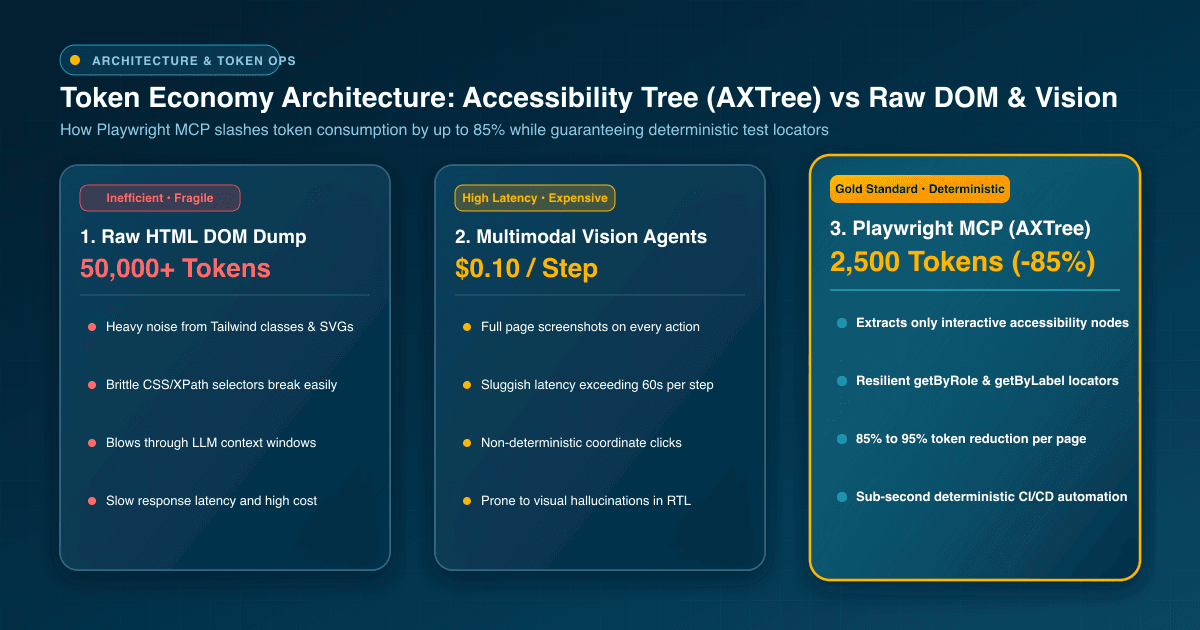
Architectural Comparison: Classical Locators vs Vision Agents vs Playwright MCP
The following architectural comparison summarizes the core operational trade-offs for software engineering teams in 2026:
- Traditional CSS/XPath Locators: Ultra-fast execution (<100ms) but extremely fragile; high maintenance overhead requiring manual developer intervention on every frontend UI change.
- Vision-Based Multimodal Agents: Highly flexible at understanding visual layout but prohibitively slow, expensive, and non-deterministic for automated CI/CD gating.
- Playwright MCP Harness: Combines autonomous semantic exploration with deterministic execution, low token overhead, and automatic translation into maintainable TypeScript test files.
Validating Bidirectional RTL and Multilingual Interfaces
For enterprise products operating in MENA and international markets, bilingual testing (Arabic RTL and English LTR) is a frequent source of regression bugs. Mirrored layouts, bidirectional text wrapping, and contextual currency conversions frequently break rigid coordinate-based test runners.
Playwright MCP navigates localized interfaces seamlessly because it evaluates accessibility roles and semantic labels rather than physical screen coordinates. The agent effortlessly validates Arabic form submissions, payment gateway modals, and right-to-left layout constraints, ensuring equal test coverage across all supported locales.
To learn how we design and engineer enterprise-grade multilingual web applications with automated quality guarantees, explore our Custom Web Application & Next.js Development Services to see our architectural standards.
Sandbox Isolation and Agent Security Controls
Granting an autonomous agent programmatic browser access introduces serious security considerations that demand strict defense-in-depth controls:
- Staging Environment Scoping: Enforce network-level restrictions that confine the browser agent strictly to staging domains, prohibiting any direct calls to production endpoints.
- Rootless Container Execution: Run Chromium instances inside ephemeral, unprivileged Docker containers to mitigate potential container breakout vulnerabilities.
- Synthetic Credentials: Provide the agent with ephemeral, mock credentials that contain zero sensitive customer data or production payment tokens.
import { defineConfig, devices } from '@playwright/test';

export default defineConfig({
  testDir: './tests/e2e',
  timeout: 30 * 1000,
  expect: { timeout: 5000 },
  fullyParallel: true,
  forbidOnly: !!process.env.CI,
  retries: process.env.CI ? 2 : 0,
  workers: process.env.CI ? 4 : undefined,
  reporter: [['html'], ['json', { outputFile: 'test-results.json' }]],
  use: {
    baseURL: process.env.STAGING_URL || 'https://staging.webdivs.com',
    trace: 'on-first-retry',
    screenshot: 'only-on-failure',
    video: 'retain-on-failure',
    extraHTTPHeaders: {
      'x-qa-automation-agent': 'playwright-mcp-v2',
    },
  },
  projects: [
    {
      name: 'Desktop Chrome (LTR)',
      use: { ...devices['Desktop Chrome'], locale: 'en-US' },
    },
    {
      name: 'Desktop Chrome (RTL Arabic)',
      use: { ...devices['Desktop Chrome'], locale: 'ar-EG' },
    },
    {
      name: 'Mobile Safari',
      use: { ...devices['iPhone 15'] },
    },
  ],
});- Indirect Prompt Injection Defense: Strip untrusted user-generated content from page snapshots to prevent malicious external inputs from hijacking agent execution flow.
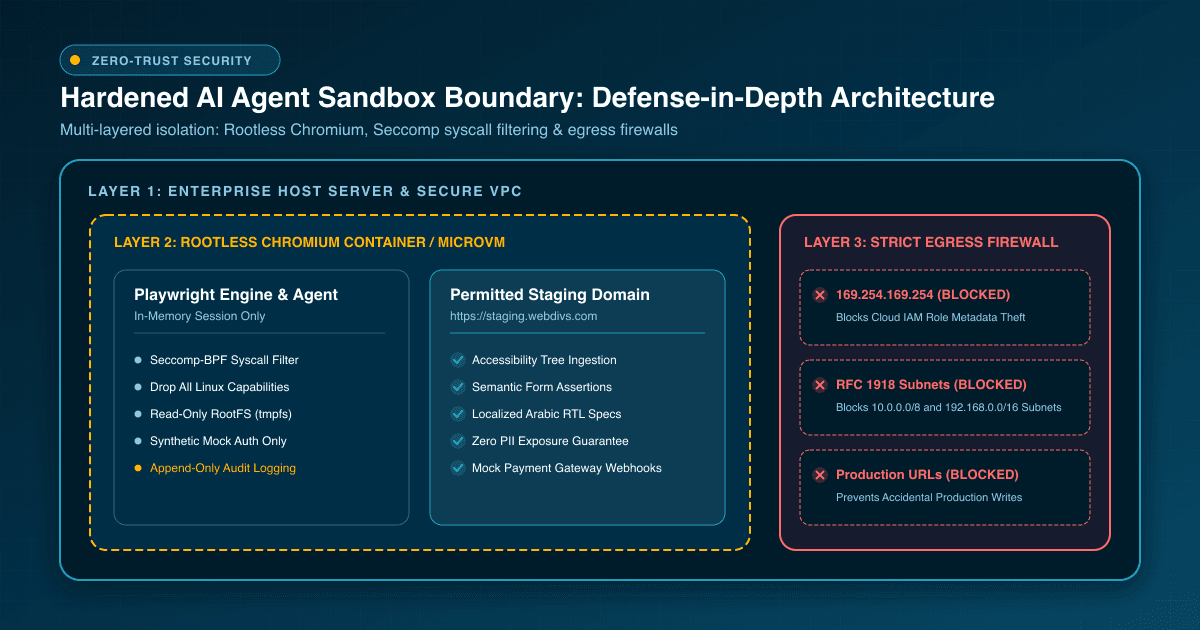
Discover how we architect secure cloud environments, isolated container runners, and hardened CI/CD pipelines through our Cloud Hosting & Managed DevOps Services tailored for growing engineering organizations.
From Autonomous Exploration to Deterministic CI/CD Test Suites
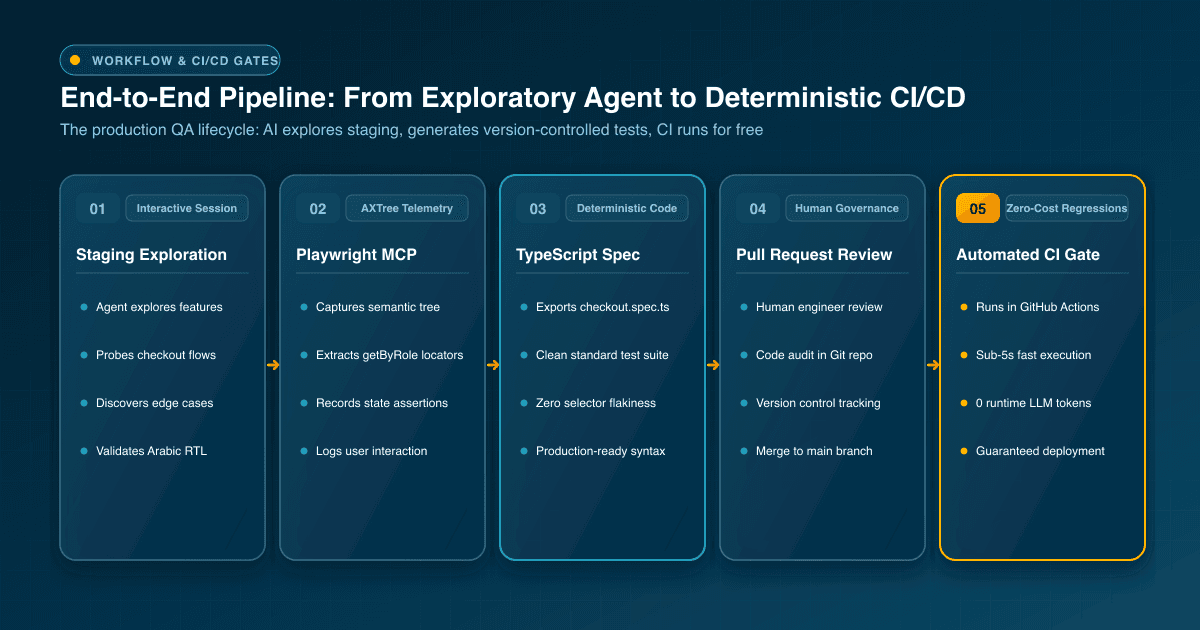
A major anti-pattern in early AI adoption is running non-deterministic agent loops directly inside production CI/CD pipelines. This wastes budget and introduces flakiness into deployment gates. The engineering standard established by Webdivs follows a disciplined workflow: 'Explore with AI agents, deploy deterministic TypeScript.'
QA engineers initiate a Playwright MCP session to interactively explore new features, probe boundary conditions, and test complex edge cases. The MCP server records every interaction into standard @playwright/test TypeScript code. The resulting test files are committed to the code repository, reviewed via standard pull requests, and executed deterministically in CI pipelines without ongoing LLM token costs.
import { test, expect } from '@playwright/test';

test.describe('E-Commerce Checkout Regression Suite', () => {
  test('should complete multi-step checkout in Arabic RTL with semantic assertions', async ({ page }) => {
    // 1. Navigate to localized store
    await page.goto('/ar/store');

    // 2. Select product using accessible semantic role
    const productCard = page.getByRole('article', { name: /تصميم باقة احترافية/i });
    await expect(productCard).toBeVisible();
    await productCard.getByRole('button', { name: /أضف إلى السلة/i }).click();

    // 3. Open cart and verify localized currency and price
    const cartButton = page.getByRole('button', { name: /سلة المشتريات/i });
    await cartButton.click();
    await expect(page.getByText(/المجموع الفرعي/i)).toBeVisible();

    // 4. Fill checkout form with isolated synthetic credentials
    await page.getByRole('textbox', { name: /الاسم بالكامل/i }).fill('مهندس جودة تجريبي');
    await page.getByRole('textbox', { name: /البريد الإلكتروني/i }).fill('qa-sandbox@webdivs.net');

    // 5. Submit order and assert success confirmation banner
    await page.getByRole('button', { name: /تأكيد الطلب والدفع/i }).click();
    await expect(page.getByRole('heading', { name: /تم استلام طلبك بنجاح/i })).toBeVisible({ timeout: 10000 });
  });
});
Planning a modern platform overhaul with built-in automated testing and modern frameworks? Read our detailed guide on Migrating from Legacy CMS to Modern Next.js for an architectural roadmap.
Webdivs Engineering Recommendations for Playwright MCP Adoption
Adopt Playwright MCP incrementally: start by equipping QA engineers with MCP-assisted tooling in Cursor or VS Code for exploratory testing on staging branches. Use agent interactions to uncover overlooked edge cases, but insist on exporting verified flows into version-controlled TypeScript test specs. This provides maximum test coverage with zero ongoing CI flakiness.
Frequently Asked Questions
Quick answers about this topic
No. In a mature QA architecture, Playwright MCP is used by engineers to explore interfaces and generate code. The generated TypeScript tests run deterministically in CI pipelines without runtime LLM costs.
AXTree strips away styling noise, deeply nested divs, and SVG paths, presenting only interactive controls and semantic labels. This reduces token consumption by up to 85% and prevents selector breakage.
Because Playwright MCP queries elements by semantic role and accessible name rather than screen coordinates, mirrored layouts and RTL flows are validated with the same accuracy as LTR pages.
Teams must restrict agents to staging environments, run headless browsers inside unprivileged Docker containers, provide ephemeral synthetic test credentials, and block external outbound traffic.
Related Articles
View all articles →
7 Open-Source macOS Apps to Elevate Productivity and System Control
An editorial deep dive into seven open-source macOS tools for window management, screen recording, and hardware tuning, complete with workflows and compatibility notes.

Exploring Bencho: Interactive UI Component Inspiration
Bencho introduces a visual catalog of interactive UI blocks that developers and designers can test live, offering an alternative to static design mockups.
Deterministic Generative UI Architecture: Constraining AI to Enterprise Design Systems with Next.js and shadcn/ui
How to architect deterministic generative UI that respects enterprise brand governance: binding LLM outputs to validated Zod schemas, streaming React Server Components in Next.js 16, and handling bidirectional RTL layouts.
Want this for your product?
Send a short note about your project. We will review it and explain the next useful step.
Contact Our Team