
Samsung Gallery and OneDrive Sync Deprecation (Sept 2026): Enterprise Data Migration and Cloud Storage Playbook
Direct Answer: The permanent termination of Samsung Gallery and Microsoft OneDrive synchronization (effective 30 September 2026) is a critical wake-up call against enterprise reliance on consumer cloud sync. While existing media remains preserved in OneDrive, automatic mobile ingestion will cease permanently. Businesses must transition from consumer sync to self-hosted private cloud infrastructure (e.g. Nextcloud or MinIO S3) governed by the robust 3-2-1-1-0 enterprise backup standard, ensuring full data sovereignty and eliminating recurring per-seat SaaS costs.
The 30 September 2026 Deprecation: What Actually Changes
Microsoft and Samsung have officially formalized the deprecation of direct, bilateral synchronization between the Samsung Gallery application and Microsoft OneDrive cloud storage, establishing 30 September 2026 as the firm global shutdown date. This deprecation directly impacts tens of thousands of media production studios, architectural firms, field engineering teams, and corporate marketing departments that rely on Samsung mobile devices for asset capture.
A crucial technical distinction must be emphasized: the deprecation does not delete media already archived in your enterprise OneDrive storage. Rather, it permanently severs the automated background pipeline transferring photos and videos from camera hardware to cloud repositories. The core technical imperative is executing a structured decoupling without triggering accidental bilateral deletion events, while establishing a sovereign private cloud alternative before the deadline.
The Operational Liabilities of Consumer Cloud Synchronization
Engineering leadership has long warned against relying on consumer-tier file synchronization protocols for mission-critical enterprise workflows. Consumer tools prioritize convenience over governance, introducing severe operational vulnerabilities:
- 1. Absence of Granular RBAC: Consumer sync tools lack distinct write-once permissions. If a field employee accidentally deletes localized assets on a mobile device, bilateral synchronization frequently cascades that deletion directly to cloud backups.
- 2. Unilateral Vendor Policy Volatility: Arbitrary partnership dissolutions, sudden feature deprecations, and pricing restructuring create severe operational disruptions and forced migration timelines.
- 3. Compounding Per-Seat SaaS Subscriptions: Procuring individual storage licenses for growing teams produces steep exponential subscription costs compared to self-hosted cloud infrastructure.
- 4. Data Sovereignty and Compliance Exposure: Storing enterprise operational intellectual property within multi-tenant consumer clouds complicates compliance with regional data privacy mandates across the MENA region.
To escape public cloud vendor lock-in and secure full data ownership, explore our tailored Managed Cloud Hosting & Dedicated Server Solutions engineered for sovereign enterprise operations.
The Gold Standard: The 3-2-1-1-0 Enterprise Backup Strategy
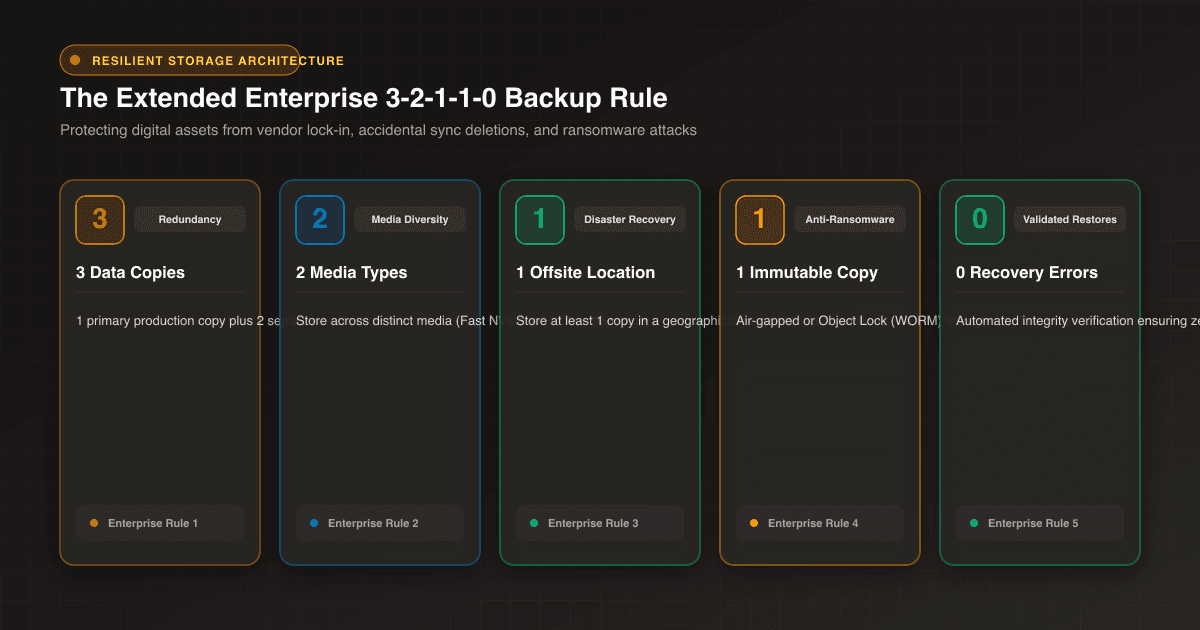
Protecting corporate digital assets demands mathematical redundancy that eliminates single points of failure. At Webdivs, we advise engineering and IT departments to transition to the battle-tested 3-2-1-1-0 backup rule:
- 3 Total Copies: Maintain three independent copies of all corporate digital assets (the active production repository plus two distinct backup archives).
- 2 Different Media Types: Distribute data across two separate storage media technologies (e.g., high-throughput local NVMe storage and immutable S3 object storage buckets).
- 1 Offsite Facility: Maintain at least one copy in a geographically disparate data center to survive regional disaster events.
- 1 Immutable / Air-Gapped Copy: Ensure one copy resides on write-once, tamper-proof storage (WORM) that is physically or cryptographically isolated against ransomware encryption.
- 0 Restoration Errors: Execute automated periodic test restores to guarantee 100% data integrity and eliminate recovery failures during catastrophic events.
To compare bare-metal dedicated servers against hyper-scale cloud storage architectures, review our comprehensive Enterprise Hosting & Cloud Storage Comparison Guide for technical and financial clarity.
Automated Server-to-Server Data Migration Blueprint
Executing an enterprise migration without straining local office network bandwidth requires automated server-to-server data pipelines:
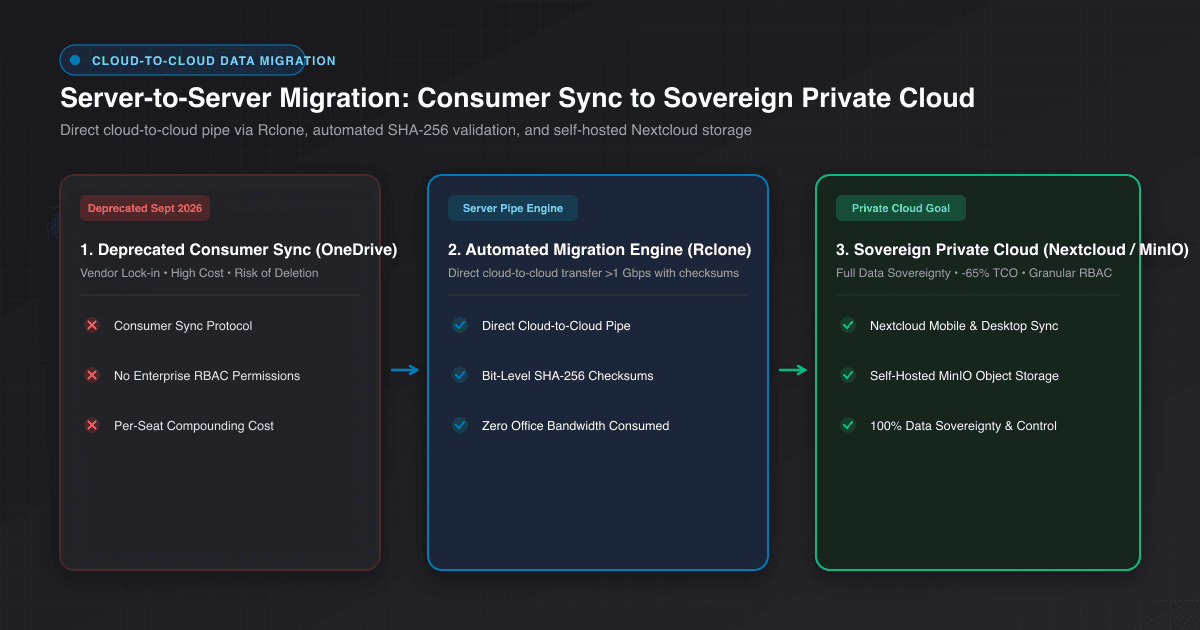
- 1. Cloud-to-Cloud Orchestration: Utilize high-throughput tools (such as rclone or Microsoft Graph API automation) to ingest OneDrive media directly into sovereign S3 storage over multi-gigabit data center backbones, bypassing local bandwidth constraints entirely.
- 2. Cryptographic Checksum Validation: Compute and verify MD5 and SHA-256 checksums across all transferred assets to ensure zero file corruption across gigabytes of video and photo data.
#!/bin/bash
# Automated High-Speed OneDrive to Enterprise S3 Sync with Checksum Verification
set -euo pipefail

SOURCE="onedrive_enterprise:Photos/Camera"
DESTINATION="private_s3:corporate-media-archive/2026"
LOG_FILE="/var/log/webdivs/onedrive_migration_$(date +%Y%m%d).log"

echo "=== Starting Server-to-Server Migration: $SOURCE -> $DESTINATION ==="

# Execute Rclone sync with multi-threaded transfers and MD5 validation
rclone sync "$SOURCE" "$DESTINATION" \
  --transfers=16 \
  --checkers=32 \
  --checksum \
  --fast-list \
  --retries=5 \
  --retries-sleep=10s \
  --log-file="$LOG_FILE" \
  --log-level=INFO \
  --stats=30s \
  --stats-one-line

# Verify zero discrepancies between source and target
echo "=== Running Integrity Verification Checksum Audit ==="
rclone check "$SOURCE" "$DESTINATION" --one-way >> "$LOG_FILE" 2>&1

echo "✔ Migration completed successfully with 0 checksum mismatches!"- 3. Methodical Samsung Account Decoupling: Access Samsung Cloud account preferences and decouple Microsoft OneDrive with the explicit directive to 'Retain Files in OneDrive', preventing destructive sync deletion propagation.
- 4. Deploy Enterprise Sync Agents: Push authenticated mobile client agents (e.g. Nextcloud mobile clients) across corporate devices to resume automated background media ingestion.
Sovereign Alternative: Private Cloud Architecture with Nextcloud & MinIO
The most enduring solution for forward-thinking enterprises in 2026 is building a sovereign private cloud on dedicated infrastructure utilizing proven open-source platforms:
Nextcloud Enterprise delivers a user experience rivaling consumer cloud ecosystems, complete with automated mobile background sync, granular role-based access controls, and comprehensive audit trails, with zero per-seat licensing penalties. When backed by MinIO S3 object storage clusters on dedicated servers, long-term enterprise storage expenses drop by up to 65% compared to recurring proprietary SaaS tiers.
For transparent cost projections and architectural milestone planning regarding dedicated cloud migrations, consult our Software Engineering Pricing & Milestone Packages to structure your roadmap.
Enterprise Mobility Management (MDM) Governance
For organizations managing distributed field personnel, mobile cloud synchronization must be governed centrally. Integrating devices into Mobile Device Management (MDM) platforms allows IT administrators to enforce zero-touch sync configurations, disable unapproved personal cloud services, mandate hardware encryption, and perform remote corporate wipes if devices are compromised.
Conclusion: Transforming a Deprecation into Data Sovereignty
The impending Samsung-OneDrive sync shutdown serves as an undeniable reminder that consumer cloud services are incompatible with enterprise permanence. By proactively adopting the 3-2-1-1-0 backup framework and deploying private cloud infrastructure, your organization secures total data ownership, superior operational resilience, and permanent cost efficiency.
Frequently Asked Questions
Quick answers about this topic
No. Existing photos and videos remain safely stored in Microsoft OneDrive. However, automatic background sync from Samsung Gallery to OneDrive will stop permanently.
Consumer sync tools lack granular RBAC and write-once controls. If a user deletes an image on a mobile device, bilateral sync can delete the cloud backup instantly.
It mandates 3 copies of data, across 2 different media types, with 1 offsite copy, 1 immutable/air-gapped copy, and 0 recovery verification errors.
It eliminates recurring per-user monthly SaaS fees and provides unlimited users and TBs of storage on fixed-cost dedicated infrastructure, cutting expenses by up to 65%.
Related Articles
View all articles →
Want this for your product?
Send a short note about your project. We will review it and explain the next useful step.
Contact Our Team